1. It is better to be first than it is to be better.
2. If you can't be first in a category, set up a new category you can be first in.
3. It is better to be first in the mind than to be first in the marketplace.
4. Marketing is not a battle of products, it's a battle of perceptions.
5. The most powerful concept in marketing is owning a word in the prospect's mind.
6. Two companies cannot own the same word in the prospect's mind.
7. The strategy to use depends on which rung you occupy on the ladder.
8. In the long run, every market becomes a two horse race.
9. If you are shooting for second place, your strategy is determined by the leader.
10. Over time, a category will divide and become two or more categories.
11. Marketing effects take place over an extended period of time.
12. There is an irresistible pressure to extend the equity of the brand.
13. You have to give up something to get something.
14. For every attribute, there is an opposite, effective attribute.
15. When you admit a negative, the prospect will give you a positive.
16. In each situation, only one move will produce substantial results.
17. Unless you write your competitor's plans, you can't predict the future.
18. Success often leads to arrogance, and arrogance to failure.
19. Failure is to be expected and accepted.
20. The situation is often the opposite of the way it appears in the press.
21. Successful programs are not built on fads, they're built on trends.
22. Without adequate funding, an idea won't get off the ground.
SOURCE: The 22 Immutable Laws of Marketing
Tuesday, November 25, 2008

The 11 Immutable Laws of Internet Branding
1. The Law of Either/Or asserts that the Internet should be viewed as an entirely new business, starting from scratch, not just a new medium through which an existing business will be communicating it's message. Well, maybe. Though some of the strongest Internet brands, such as Amazon.com and eBay.com are Web-only companies, I think there's a big place for brick-and-mortar businesses to go online and establish their brands there, too. We're still early in the game.
2. The Law of Interactivity contends that a website must be interactive in order to succeed. That interactivity is not just selecting from a menu, but typing in instructions and having the site deliver the information in the form you requested it. That's an ideal, but I'm not convinced it's essential for success.
3. The Law of the Common Name argues that common names such as Art.com or Advertising.com are poor brands. I'm not so sure I agree. After all, ArtUFrame.com doubled its sales the month after it acquired art.com.
4. The Law of the Proper Name asserts that proper names are to be preferred to generic names. This is the flip side of "immutable" law #3 that is unconvincing. But the authors give great advice on selecting a name. They suggest that the best names will follow most of these eight principles: (1) short, (2) simple, (3) suggestive of the category, (4) unique, (5) alliterative, (6) speakable, (7) shocking, and (8) personalized.
5. The Law of Singularity affirms that, whereas in the "real world" there is room for a number two brand, on the Internet there is room for only one. Smaller businesses must be niche players, but they too must be number one in their chosen niche. I'm not sure I agree with this one either; it's just too early to tell.
6. The Law of Advertising concludes that advertising off the Net will be a lot bigger than advertising on the Net. Maybe so, but I think this is oversimplified; its examples are primarily banner ads, while e-mail marketing is scarcely mentioned.
7. The Law of Globalism claims that the Internet will demolish all barriers, all boundaries, and all borders. Here's a law I agree with.
8. The Law of Time contends that the brand that is first into the prospect's mind has the advantage, not necessarily the first into the marketplace. I would agree with that one, too.
9. The Law of Vanity says that you shouldn't try to include more and more categories under a single brand. This is the same argument against "brand extension" that Ries and Trout put forth in The 22 Immutable Laws of Marketing in 1994. Ries and Ries counsel the reader to keep the original brand focused, and instead, launch a new brand. Thus Amazon's move to be a department store while it is associated in the prospect's mind with books and CDs is risky. So is Yahoo's move to place every kind of service under its brand name. Perhaps so. I deliberately followed this advice when I launched my successful new Doctor EbizTM brand http://doctorebiz.com rather than trying to extend the Web Marketing Today® brand. I think the authors touch on an important point here.
10. The Law of Divergence goes against the current obsession with technologies such as the telephone, TV, and PC converging. Rather, say the authors, technologies diverge into PCs, PDAs, minicomputers, mainframes, laptops, etc. Therefore, they continue, Internet brands built on "you can get it all done here at this single site," all-in-one services, are going against the laws of nature. Maybe, but I doubt whether this observation should qualify as one of Internet branding's 11 immutable laws.
11. The Law of Transformation says that the Internet will transform all aspects of our lives. Examples are paper directories, paper catalogs, full color brochures, the telephone industry, classified ads in newspapers, post office mail volume, financial services, and parcel delivery. Agreed. Internet retailing will focus on price while "outernet" retailing will focus on service. Yes, but I'm not sure that theory qualifies as an immutable law either.
SOURCE: Book Review: The 11 Immutable Laws of Internet Branding
2. The Law of Interactivity contends that a website must be interactive in order to succeed. That interactivity is not just selecting from a menu, but typing in instructions and having the site deliver the information in the form you requested it. That's an ideal, but I'm not convinced it's essential for success.
3. The Law of the Common Name argues that common names such as Art.com or Advertising.com are poor brands. I'm not so sure I agree. After all, ArtUFrame.com doubled its sales the month after it acquired art.com.
4. The Law of the Proper Name asserts that proper names are to be preferred to generic names. This is the flip side of "immutable" law #3 that is unconvincing. But the authors give great advice on selecting a name. They suggest that the best names will follow most of these eight principles: (1) short, (2) simple, (3) suggestive of the category, (4) unique, (5) alliterative, (6) speakable, (7) shocking, and (8) personalized.
5. The Law of Singularity affirms that, whereas in the "real world" there is room for a number two brand, on the Internet there is room for only one. Smaller businesses must be niche players, but they too must be number one in their chosen niche. I'm not sure I agree with this one either; it's just too early to tell.
6. The Law of Advertising concludes that advertising off the Net will be a lot bigger than advertising on the Net. Maybe so, but I think this is oversimplified; its examples are primarily banner ads, while e-mail marketing is scarcely mentioned.
7. The Law of Globalism claims that the Internet will demolish all barriers, all boundaries, and all borders. Here's a law I agree with.
8. The Law of Time contends that the brand that is first into the prospect's mind has the advantage, not necessarily the first into the marketplace. I would agree with that one, too.
9. The Law of Vanity says that you shouldn't try to include more and more categories under a single brand. This is the same argument against "brand extension" that Ries and Trout put forth in The 22 Immutable Laws of Marketing in 1994. Ries and Ries counsel the reader to keep the original brand focused, and instead, launch a new brand. Thus Amazon's move to be a department store while it is associated in the prospect's mind with books and CDs is risky. So is Yahoo's move to place every kind of service under its brand name. Perhaps so. I deliberately followed this advice when I launched my successful new Doctor EbizTM brand http://doctorebiz.com rather than trying to extend the Web Marketing Today® brand. I think the authors touch on an important point here.
10. The Law of Divergence goes against the current obsession with technologies such as the telephone, TV, and PC converging. Rather, say the authors, technologies diverge into PCs, PDAs, minicomputers, mainframes, laptops, etc. Therefore, they continue, Internet brands built on "you can get it all done here at this single site," all-in-one services, are going against the laws of nature. Maybe, but I doubt whether this observation should qualify as one of Internet branding's 11 immutable laws.
11. The Law of Transformation says that the Internet will transform all aspects of our lives. Examples are paper directories, paper catalogs, full color brochures, the telephone industry, classified ads in newspapers, post office mail volume, financial services, and parcel delivery. Agreed. Internet retailing will focus on price while "outernet" retailing will focus on service. Yes, but I'm not sure that theory qualifies as an immutable law either.
SOURCE: Book Review: The 11 Immutable Laws of Internet Branding
Tuesday, November 18, 2008
AdSense Calculator
The AdSense Calculator helps Google AdSense affiliates understand what affects their earnings by letting them experiment with values.
It also allows Google AdSense users to take their current statistics and calculate how much they can expect to earn daily, monthly and yearly. Site owners who are considering implementing AdSense on their site(s) can also use this tool to estimate what results they are likely to see.
Daily Page Impressions
Daily page impressions indicate how many times ads are shown per page. You can use your average, anticipated, or current daily page impressions for this
Click Through Rate (CTR)
This figure represents how many visitors actually click your advertisements. You can find this easily on your Google AdSense stats page labeled "CTR." The average rate is estimated to be about 1.5%.
Cost Per Click (CPC)
Your CPC is the average of how much you get paid for someone clicking one of your advertisements. To find your average CPC take you’re the amount of money you have earned from AdSense (daily, monthly, or all time) and divide it by your total clicks (daily, monthly, or all time).
source: http://www.seochat.com
It also allows Google AdSense users to take their current statistics and calculate how much they can expect to earn daily, monthly and yearly. Site owners who are considering implementing AdSense on their site(s) can also use this tool to estimate what results they are likely to see.
Daily Page Impressions
Daily page impressions indicate how many times ads are shown per page. You can use your average, anticipated, or current daily page impressions for this
Click Through Rate (CTR)
This figure represents how many visitors actually click your advertisements. You can find this easily on your Google AdSense stats page labeled "CTR." The average rate is estimated to be about 1.5%.
Cost Per Click (CPC)
Your CPC is the average of how much you get paid for someone clicking one of your advertisements. To find your average CPC take you’re the amount of money you have earned from AdSense (daily, monthly, or all time) and divide it by your total clicks (daily, monthly, or all time).
 |  | | |  |
Adsense Calculator Tool © SEO Chat™ | ||||
 | |  | ||
source: http://www.seochat.com
Monday, November 17, 2008
Differences Between the Major Search Engines
Although the basic principle of operation of all search engines is the same, the minor differences between them lead to major changes in results relevancy. For different search engines different factors are important. There were times, when SEO experts joked that the algorithms of Yahoo! are intentionally made just the opposite of those of Google. While this might have a grain of truth, it is a matter a fact that the major search engines like different stuff and if you plan to conquer more than one of them, you need to optimize carefully.
There are many examples of the differences between search engines. For instance, for Yahoo! and MSN, on-page keyword factors are of primary importance, while for Google links are very, very important. Also, for Google sites are like wine – the older, the better, while Yahoo! generally has no expressed preference towards sites and domains with tradition (i.e. older ones). Thus you might need more time till your site gets mature to be admitted to the top in Google, than in Yahoo!.
source: http://www.webconfs.com
There are many examples of the differences between search engines. For instance, for Yahoo! and MSN, on-page keyword factors are of primary importance, while for Google links are very, very important. Also, for Google sites are like wine – the older, the better, while Yahoo! generally has no expressed preference towards sites and domains with tradition (i.e. older ones). Thus you might need more time till your site gets mature to be admitted to the top in Google, than in Yahoo!.
source: http://www.webconfs.com
How Search Engines Work
The first basic truth you need to learn about SEO is that search engines are not humans. While this might be obvious for everybody, the differences between how humans and search engines view web pages aren't. Unlike humans, search engines are text-driven. Although technology advances rapidly, search engines are far from intelligent creatures that can feel the beauty of a cool design or enjoy the sounds and movement in movies. Instead, search engines crawl the Web, looking at particular site items (mainly text) to get an idea what a site is about. This brief explanation is not the most precise because as we will see next, search engines perform several activities in order to deliver search results – crawling, indexing, processing, calculating relevancy, and retrieving.
First, search engines crawl the Web to see what is there. This task is performed by e piece of software, called a crawler or a spider (or Googlebot, as is the case with Google). Spiders follow links from one page to another and index everything they find on their way. Having in mind the number of pages on the Web (over 20 billion), it is impossible for a spider to visit a site daily just to see if a new page has appeared or if an existing page has been modified. Sometimes crawlers will not visit your site for a month or two, so during this time your SEO efforts will not be rewarded. But there is nothing you can do about it, so just keep quiet.
What you can do is to check what a crawler sees from your site. As already mentioned, crawlers are not humans and they do not see images, Flash movies, JavaScript, frames, password-protected pages and directories, so if you have tons of these on your site, you'd better run the Spider Simulator below to see if these goodies are viewable by the spider. If they are not viewable, they will not be spidered, not indexed, not processed, etc. - in a word they will be non-existent for search engines.s
After a page is crawled, the next step is to index its content. The indexed page is stored in a giant database, from where it can later be retrieved. Essentially, the process of indexing is identifying the words and expressions that best describe the page and assigning the page to particular keywords. For a human it will not be possible to process such amounts of information but generally search engines deal just fine with this task. Sometimes they might not get the meaning of a page right but if you help them by optimizing it, it will be easier for them to classify your pages correctly and for you – to get higher rankings.
When a search request comes, the search engine processes it – i.e. it compares the search string in the search request with the indexed pages in the database. Since it is likely that more than one pages (practically it is millions of pages) contains the search string, the search engine starts calculating the relevancy of each of the pages in its index to the search string.
There are various algorithms to calculate relevancy. Each of these algorithms has different relative weights for common factors like keyword density, links, or metatags. That is why different search engines give different search results pages for the same search string. What is more, it is a known fact that all major search engines, like Yahoo!, Google, MSN, etc. periodically change their algorithms and if you want to keep at the top, you also need to adapt your pages to the latest changes. This is one reason (the other is your competitors) to devote permanent efforts to SEO, if you'd like to be at the top.
The last step in search engines' activity is retrieving the results. Basically, it is nothing more than simply displaying them in the browser – i.e. the endless pages of search results that are sorted from the most relevant to the least relevant sites.
source: http://www.webconfs.com
First, search engines crawl the Web to see what is there. This task is performed by e piece of software, called a crawler or a spider (or Googlebot, as is the case with Google). Spiders follow links from one page to another and index everything they find on their way. Having in mind the number of pages on the Web (over 20 billion), it is impossible for a spider to visit a site daily just to see if a new page has appeared or if an existing page has been modified. Sometimes crawlers will not visit your site for a month or two, so during this time your SEO efforts will not be rewarded. But there is nothing you can do about it, so just keep quiet.
What you can do is to check what a crawler sees from your site. As already mentioned, crawlers are not humans and they do not see images, Flash movies, JavaScript, frames, password-protected pages and directories, so if you have tons of these on your site, you'd better run the Spider Simulator below to see if these goodies are viewable by the spider. If they are not viewable, they will not be spidered, not indexed, not processed, etc. - in a word they will be non-existent for search engines.s
After a page is crawled, the next step is to index its content. The indexed page is stored in a giant database, from where it can later be retrieved. Essentially, the process of indexing is identifying the words and expressions that best describe the page and assigning the page to particular keywords. For a human it will not be possible to process such amounts of information but generally search engines deal just fine with this task. Sometimes they might not get the meaning of a page right but if you help them by optimizing it, it will be easier for them to classify your pages correctly and for you – to get higher rankings.
When a search request comes, the search engine processes it – i.e. it compares the search string in the search request with the indexed pages in the database. Since it is likely that more than one pages (practically it is millions of pages) contains the search string, the search engine starts calculating the relevancy of each of the pages in its index to the search string.
There are various algorithms to calculate relevancy. Each of these algorithms has different relative weights for common factors like keyword density, links, or metatags. That is why different search engines give different search results pages for the same search string. What is more, it is a known fact that all major search engines, like Yahoo!, Google, MSN, etc. periodically change their algorithms and if you want to keep at the top, you also need to adapt your pages to the latest changes. This is one reason (the other is your competitors) to devote permanent efforts to SEO, if you'd like to be at the top.
The last step in search engines' activity is retrieving the results. Basically, it is nothing more than simply displaying them in the browser – i.e. the endless pages of search results that are sorted from the most relevant to the least relevant sites.
source: http://www.webconfs.com
What Is SEO?
Search Engine Optimization (SEO) is often considered the more technical part of Web marketing. This is true because SEO does help in the promotion of sites and at the same time it requires some technical knowledge – at least familiarity with basic HTML. SEO is sometimes also called SEO copyrighting because most of the techniques that are used to promote sites in search engines deal with text. Generally, SEO can be defined as the activity of optimizing Web pages or whole sites in order to make them more search engine-friendly, thus getting higher positions in search results.
One of the basic truths in SEO is that even if you do all the things that are necessary to do, this does not automatically guarantee you top ratings but if you neglect basic rules, this certainly will not go unnoticed. Also, if you set realistic goals – i.e to get into the top 30 results in Google for a particular keyword, rather than be the number one for 10 keywords in 5 search engines, you will feel happier and more satisfied with your results.
Although SEO helps to increase the traffic to one's site, SEO is not advertising. Of course, you can be included in paid search results for given keywords but basically the idea behind the SEO techniques is to get top placement because your site is relevant to a particular search term, not because you pay.
SEO can be a 30-minute job or a permanent activity. Sometimes it is enough to do some generic SEO in order to get high in search engines – for instance, if you are a leader for rare keywords, then you do not have a lot to do in order to get decent placement. But in most cases, if you really want to be at the top, you need to pay special attention to SEO and devote significant amounts of time and effort to it. Even if you plan to do some basic SEO, it is essential that you understand how search engines work and which items are most important in SEO.
source: http://www.webconfs.com
One of the basic truths in SEO is that even if you do all the things that are necessary to do, this does not automatically guarantee you top ratings but if you neglect basic rules, this certainly will not go unnoticed. Also, if you set realistic goals – i.e to get into the top 30 results in Google for a particular keyword, rather than be the number one for 10 keywords in 5 search engines, you will feel happier and more satisfied with your results.
Although SEO helps to increase the traffic to one's site, SEO is not advertising. Of course, you can be included in paid search results for given keywords but basically the idea behind the SEO techniques is to get top placement because your site is relevant to a particular search term, not because you pay.
SEO can be a 30-minute job or a permanent activity. Sometimes it is enough to do some generic SEO in order to get high in search engines – for instance, if you are a leader for rare keywords, then you do not have a lot to do in order to get decent placement. But in most cases, if you really want to be at the top, you need to pay special attention to SEO and devote significant amounts of time and effort to it. Even if you plan to do some basic SEO, it is essential that you understand how search engines work and which items are most important in SEO.
source: http://www.webconfs.com
Top 10 SEO Mistakes
1. Targetting the wrong keywords
This is a mistake many people make and what is worse – even experienced SEO experts make it. People choose keywords that in their mind are descriptive of their website but the average users just may not search them. For instance, if you have a relationship site, you might discover that “relationship guide” does not work for you, even though it has the “relationship” keyword, while “dating advice” works like a charm. Choosing the right keywords can make or break your SEO campaign. Even if you are very resourceful, you can't think on your own of all the great keywords but a good keyword suggestion tool, for instance, the Website Keyword Suggestion tool will help you find keywords that are good for your site.
2. Ignoring the Title tag
Leaving the title tag empty is also very common. This is one of the most important places to have a keyword, because not only does it help you in optimization but the text in your title tag shows in the search results as your page title.
3. A Flash website without a html alternative
Flash might be attractive but not to search engines and users. If you really insist that your site is Flash-based and you want search engines to love it, provide an html version. Here are some more tips for optimizing Flash sites. Search engines don't like Flash sites for a reason – a spider can't read Flash content and therefore can't index it.
4. JavaScript Menus
Using JavaScript for navigation is not bad as long as you understand that search engines do not read JavaScript and build your web pages accordingly. So if you have JavaScript menus you can't do without, you should consider build a sitemap (or putting the links in a noscript tag) so that all your links will be crawlable.
5. Lack of consistency and maintenance
Our friend Rob from Blackwood Productions often encounters clients, who believe that once you optimize a site, it is done foreve. If you want to be successful, you need to permanently optimize your site, keep an eye on the competition and – changes in the ranking algorithms of search engines.
6. Concentrating too much on meta tags
A lot of people seem to think SEO is about getting your meta keywords and description correct! In fact, meta tags are becoming (if not already) a thing of the past. You can create your meta keywords and descriptions but don't except to rank well only because of this.
7. Using only Images for Headings
Many people think that an image looks better than text for headings and menus. Yes, an image can make your site look more distinctive but in terms of SEO images for headings and menus are a big mistake because h2, h2, etc. tags and menu links are important SEO items. If you are afraid that your h1 h2, etc. tags look horrible, try modifying them in a stylesheet or consider this approach: http://www.stopdesign.com/articles/replace_text.
8. Ignoring URLs
Many people underestimate how important a good URL is. Dynamic page names are still very frequent and no keywords in the URL is more a rule than an exception. Yes, it is possible to rank high even without keywords in the URL but all being equal, if you have keywords in the URL (the domain itself, or file names, which are part of the URL), this gives you additional advantage over your competitors. Keywords in URLs are more important for MSN and Yahoo! but even with Google their relative weight is high, so there is no excuse for having keywordless URLs.
9. Backlink spamming
It is a common delusion that it more backlinks are ALWAYS better and because of this web masters resort to link farms, forum/newgroup spam etc., which ultimately could lead to getting their site banned. In fact, what you need are quality backlinks. Here are some more information on The Importance of Backlinks (http://www.webconfs.com/importance-of-backlinks-article-5.php)
10. Lack of keywords in the content
Once you focus on your keywords, modify your content and put the keywords wherever it makes sense. It is even better to make them bold or highlight them.
source: http://www.webconfs.com/
This is a mistake many people make and what is worse – even experienced SEO experts make it. People choose keywords that in their mind are descriptive of their website but the average users just may not search them. For instance, if you have a relationship site, you might discover that “relationship guide” does not work for you, even though it has the “relationship” keyword, while “dating advice” works like a charm. Choosing the right keywords can make or break your SEO campaign. Even if you are very resourceful, you can't think on your own of all the great keywords but a good keyword suggestion tool, for instance, the Website Keyword Suggestion tool will help you find keywords that are good for your site.
2. Ignoring the Title tag
Leaving the title tag empty is also very common. This is one of the most important places to have a keyword, because not only does it help you in optimization but the text in your title tag shows in the search results as your page title.
3. A Flash website without a html alternative
Flash might be attractive but not to search engines and users. If you really insist that your site is Flash-based and you want search engines to love it, provide an html version. Here are some more tips for optimizing Flash sites. Search engines don't like Flash sites for a reason – a spider can't read Flash content and therefore can't index it.
4. JavaScript Menus
Using JavaScript for navigation is not bad as long as you understand that search engines do not read JavaScript and build your web pages accordingly. So if you have JavaScript menus you can't do without, you should consider build a sitemap (or putting the links in a noscript tag) so that all your links will be crawlable.
5. Lack of consistency and maintenance
Our friend Rob from Blackwood Productions often encounters clients, who believe that once you optimize a site, it is done foreve. If you want to be successful, you need to permanently optimize your site, keep an eye on the competition and – changes in the ranking algorithms of search engines.
6. Concentrating too much on meta tags
A lot of people seem to think SEO is about getting your meta keywords and description correct! In fact, meta tags are becoming (if not already) a thing of the past. You can create your meta keywords and descriptions but don't except to rank well only because of this.
7. Using only Images for Headings
Many people think that an image looks better than text for headings and menus. Yes, an image can make your site look more distinctive but in terms of SEO images for headings and menus are a big mistake because h2, h2, etc. tags and menu links are important SEO items. If you are afraid that your h1 h2, etc. tags look horrible, try modifying them in a stylesheet or consider this approach: http://www.stopdesign.com/articles/replace_text.
8. Ignoring URLs
Many people underestimate how important a good URL is. Dynamic page names are still very frequent and no keywords in the URL is more a rule than an exception. Yes, it is possible to rank high even without keywords in the URL but all being equal, if you have keywords in the URL (the domain itself, or file names, which are part of the URL), this gives you additional advantage over your competitors. Keywords in URLs are more important for MSN and Yahoo! but even with Google their relative weight is high, so there is no excuse for having keywordless URLs.
9. Backlink spamming
It is a common delusion that it more backlinks are ALWAYS better and because of this web masters resort to link farms, forum/newgroup spam etc., which ultimately could lead to getting their site banned. In fact, what you need are quality backlinks. Here are some more information on The Importance of Backlinks (http://www.webconfs.com/importance-of-backlinks-article-5.php)
10. Lack of keywords in the content
Once you focus on your keywords, modify your content and put the keywords wherever it makes sense. It is even better to make them bold or highlight them.
source: http://www.webconfs.com/
Saturday, November 15, 2008
Making Money Through Adsense Firefox Referrals: A Look at Explorer Destroyer
Found this interesting article from http://doshdosh.com. Read on......
I’ve only recently come across Explorer Destroyer, an interesting website which helps you to make more money from Adsense by switching users from Internet Explorer to the Firefox browser.
I’ve only recently come across Explorer Destroyer, an interesting website which helps you to make more money from Adsense by switching users from Internet Explorer to the Firefox browser.
As you probably already know, Google’s Adsense referral program will pay you $1 for every person who downloads Firefox from your referral link.
Explorer Destroyer expedites the task of getting more Firefox referrals by offering a free script that allows you to automatically promote Firefox to IE users visiting your website.
Once the script is installed, a message which sells the benefits of using Firefox (along with your referral link) will appear to IE users when they visit your website or blog.
There are three types of settings for the script, depending on how aggressively you want to push for conversions. Installation instructions are clearly provided at the Explorer Destroyer website.
Level 1 will make IE visitors see a message across the top of the page, encouraging them to download Firefox.

Level 2 will direct IE Visitors to a splash plage with a download link and a link to continue to your site.

Level 3 will not allow anyone using IE to access your website. A splash page is shown instead with a Firefox download link. This seems to go against Google’s TOS, so you’ll have to use a regular, non-Adsense referral link instead.

It is interesting to note that Explorer Destroyer was started by a team of four people with the sole aim of overturning Microsoft’s dominance over the web browser market. Their manifesto offers more clues into Explorer Destroyer’s mission:
Firefox is one of the most important software applications in the world because it can play a big part in determining the future of the web. It is crucial that an open-source, standards-based web browser becomes the most popular browser, and Firefox has a shot at being that.
We’ve spent days fixing computers of our family members that have been hobbled by spyware that Internet Explorer allowed in. These annoyances alone more than justify a aggressive campaign to switch people to Firefox.
But what really matters is putting the internet back in the hands of the public and ensuring that the technology that will remake so much of our world in the next 30 years is a public resource not a corporate one.
The Explorer Destroyer idea does seem like it would lead to more Firefox downloads, although it seriously affects web usability because it interrupts the viewing experience of all visitors to your site.
Level 1 of the script setting is the least intrusive and will probably be the only one that is doable for most blogs or websites. Level 2 and 3 might be more successful in getting sign-ups but they will most definitely drive visitors away from your site as well.
See this parody website for an alternative perspective on Explorer Destroyer’s campaign to win more Firefox users.
I haven’t seen any other websites using the script so I’m not 100% sure if the script still works. If anyone has used it before or am currently using it, do leave a comment to let us know if it still works.
Update: According to various readers, the script apparently still works and you can try to download it from Explorer Destroyer’s website.
Using Blogs for AdSense Profit
Blog is the shortened vernacular for web log. They can be made by an individual or a group of individuals sounding off on any topic. They are many times commentary on every day life, including politics, war, music and art, as well as common activities and hobbies, such as car detailing or online journals or diaries. Blogs can be written using a variety of free online sites, including Blogger.com and Wordpress.com, two of the best known blogging sites online. Many allow comments from visitors to be posted to the blog for the blog author and other visitors to see. Some allow more features such as uploading pictures, requiring password authentication to view, and, for our interests, including Google AdSense ads to potentially make money.
Blogging has an interesting history, and there is a great article on blogging, its history, growing popularity, and future on Wikipedia.
Not every blogging site allows AdSense ads, though. The one we will discuss is Blogger.com. Blogger.com is owned by Google, which is why it is so convenient to add Adsense to a Blogger blog. While submitting a URL to Google will take some time, posting a blog is instantaneous. The first step is registering for a Blogger.com account. Google is very good at not selling your email address to spammers. Who wants spam, right? In our experience, with the amount of online sites you will be signing up for, it is a good idea to create a specific email address to use just for Google AdSense related business. That way, every email sent to this address will be related to your AdSense venture.
After registering for a Blogger.com account, you can immediately begin blogging. The steps to publish a post are very easy to follow and are self-explanatory on the site.
After your first blog is created, you should create a Google AdSense account. Go to the Google AdSense main site and register for an account. You will need the URL of your blog. Although the Blogger.com account registration is completed immediately, the application for AdSense can take up to 48 hours. And the application is not guaranteed to be successful. That will be discussed in the AdSense Tips page in our website.
Once the blog is posted and your AdSense application is accepted by Google, you can add AdSense ads to it. Adding ads is under the Layout section of your blog settings. In the Page Elements section, the blog theme you chose will be laid out for you. The sections of the blog are displayed for you. In these sections, you are able to add AdSense ads. Click Edit in one of the sections and choose AdSense from the list of available page elements. Each layout theme will have different elements you can add.
The final step is making sure to drive traffic to your site! Blogging is such an easy way to get money from AdSense that you should not overlook it. The only tough part of blogging with AdSense is getting traffic to the blog.
Blogs can be very useful in driving traffic to your site. Creating a blog is very easy sites sites such as Blogger.com, Google's free blogging site, and using sites like Ping-o-Matic to make search engines aware of your blog. What this does is allow bloggers to send updates of their blogs to various search engines around the Internet.
However, this method of blogging and pinging is only part of the whole scheme of optimizing Google AdSense profit. Blogging can be done on almost any topic, as similarly discussed in our Helpful Articles section. The first step would be finding the right blogging site for you. We recommend Blogger.com, though there are plenty of valuable and well-searched blogging sites that work equally well. Blogger.com, as will be mentioned in the list of blogging tips below can add AdSense ads to your blog. This is because Blogger.com is a Google-owned website.
AdSense and Blogging
Blogs can be very useful in driving traffic to your site. Creating a blog is very easy sites sites such as Blogger.com, Google's free blogging site, and using sites like Ping-o-Matic to make search engines aware of your blog. What this does is allow bloggers to send updates of their blogs to various search engines around the Internet.
However, this method of blogging and pinging is only part of the whole scheme of optimizing Google AdSense profit. Blogging can be done on almost any topic, as similarly discussed in our Helpful Articles section. The first step would be finding the right blogging site for you. We recommend Blogger.com, though there are plenty of valuable and well-searched blogging sites that work equally well. Blogger.com, as will be mentioned in the list of blogging tips below can add AdSense ads to your blog. This is because Blogger.com is a Google-owned website.
Adsense Formula
If you're just getting started, there's a simple formula for you to understand how to earn money with google adsense:
Revenue = Traffic * CTR * CPC
You probably understand what traffic means.
So CTR is Click Through rate, and it means how many of your visitors are clicking ads. It actually depends on how your site is adsense-optimized.
CPC is Cost Per Click. Different words have different costs. Some can be about $0,01, some are over $10.
Thursday, November 13, 2008
15 Common Mistakes that Violate Google Adsense TOS
Google Adsense publishers often commit common mistakes that could ban their Adsense account. Google Adsense is a popular web advertising program which provides a good income source for many websites. There are well defined terms of service to strictly adhere to when participating in the program.
source
On my visit through sites and forums, I daily notice several instances of misuse of Adsense ads. So here a few helpful Google Adsense tips, probably many you already know, and few you might gain by knowing now. These adsense faq are all picked from the Program Policies, Terms and Conditions and FAQ itself and presented in a simplified manner.
1. Never click your own adsense ads or get them clicked for whatever reason. You know this one very well. This is a surefire way to close you Adsense account. Never tell your office associates or friends to click on them. Keep a check if your family or children are busy increasing your income by clicking your ads and indirectly trying to stop your income. Dont even think of offering incentives for clicks, using automated clicking tools, or other deceptive software. Adsense is very smart to detect fraudulent clicks. Check the ads which appear on your pages by the Google Preview tool if required.
2. Never change the Adsense code. There are enough means of adsense optimization & customizations available to change the colour, background or border to suit your needs. Do whatever you want to do outside the code, never fiddle within the ad or the search code. They know it when you do. The search code has more limitations to colour and placement, but you should adhere to the rules. The code may stop working and violates the TOS.
3. Do not place more than 3 ad units and 3 ad links or 2 adsense search boxes on any web page. Anyway, ads will not appear in those units even if you place more ad units. But this is the limit they set, so it is better to stick to it.
4. Do not run competitive contextual text ad or search services on the same site which offer Google Adsense competition in their field. Never try to create link structures resembling the adsense ads. Never use other competitive search tools on the same pages which have Adsense powered Google search. They do allow affiliate or limited-text links. Update: Google has allowed you to run contextual advertising like Yahoo ads, Chitika etc provided the ads do not resemble Adsense ads.
5. Do not disclose confidential information about your account like the CTR, CPM and income derived via individual ad units or any other confidential information they may reveal to you. However, you may reveal the total money you make as per recent updates to the TOS.
6. Label headings as “sponsored links” or “advertisements” only. Other labels are not allowed. I have seen many sites label ads with other titles. Dont make your site a target in a few seconds gaze.
7. Never launch a New Page for clicked ads by default. Adsense ads should open on the same page. You may be using a base target tag to open all links in a new window or frame by default. Correct it now as they do not want new pages opening from clicked ads.
8. One Account suffices for Multiple websites. You do not need to create 5 accounts for 5 different websites. One account will do. If you live in the fear that if one account is closed down for violation of TOS, believe me they will close all accounts when they find out. You can keep track of clicks by using channels with real time statistics. They will automatically detect the new site and display relevant ads.
9. Place ads only on Content Pages. Advertisers pay only for content based ads. Content drives relevant ads. Although you might manage some clicks from error, login, registration, “thank you” or welcome pages, parking pages or pop ups, it will get you out of the program.
10. Do not mask ad elements. Alteration of colours and border is a facility to blend or contrast ads as per your site requirements. I have seen many sites where the url part is of the same colour as the background. While blending the ad with your site is a good idea, hiding relevant components of the ads is not allowed. Also do not block the visibility of ads by overlapping images, pop ups, tables etc.
11. Do not send your ads by email. Html formatted emails look good and allow placement of these javascript ads. But it is not allowed as per TOS. You do not want impressions registering on their logs from any email even once. They are watching!
12. Keep track of your content. So Adsense is not allowed on several non content pages. But it is also not allowed on several content pages too. Do not add it on web pages with MP3, Video, News Groups, and Image Results. Also exclude any pornographic, hate-related, violent, or illegal content.
13. Do not alter the results after ad clicks or searches - Ensure you are not in any way altering the site which the user reaches to after clicking the ads. Do not frame, minimize, remove, redirect or otherwise inhibit the full and complete display of any Advertiser Page or Search Results Page after the user clicks on any Ad or Search results.
14. Avoid excessive advertising and keyword stuffing - Although the definition of ‘excessive’ is a gray area and is subject to discretion, yet Google adsense with correct placement, focused content and high traffic will get you much more income than other programs, so excessive advertising is not required. Keyword stuffing does target better focused ads, but overdoing it is not required.
15. Ensure you Language is Supported - Adsense supports “Chinese (simplified), Japanese, Danish, Korean, Dutch, Norwegian, English, Polish, Finnish, Portuguese, French, Russian, German, Spanish, Hungarian, Swedish, Italian and Turkish”. In addition, AdSense for search is available in Czech, Slovak, and Traditional Chinese. If your web pages language is not supported, do not use the code on such pages.
Update:
16. Maximum 2 referral button per product per page - With the launch of the google adsense referral program, you are allowed to put only 2 referral buttons for adsense referral, adwords referral, Google pack and Firefox with google toolbar referral. Update: This feature is closing Aug 2008.
17. Do not specify Google ads as your alternate ads. - Several services like Chitika eminimalls allow you to place alternate urls, when a targeted paying ad cannot be displayed. This involved creating an simple html page and putting the ad to be displayed instead. Even Adsense allows an alternate url feature instead of displaying public service ads. But never use Adsense ads as alternate urls.
18. Do not confuse with adjacent images - It was a common policy to increase CTR by placing same number of images as the number of text ads, which falsely gave the impression that the text ads represented an explanation to these images. Inserting a small space or a line between the images and ads is not allowed. Make sure that the ads and images are not arranged in a way that could easily mislead or confuse your visitors.
Whenever in doubt, it is better to ask for adsense help from the learned staff of Google Adsense. They are very helpful!source
Adsense Section Targetting
What is section targeting and how do I implement it?
Section targeting allows you to suggest sections of your text and HTML content that you'd like us to emphasize or downplay when matching ads to your site's content. By providing us with your suggestions, you can assist us in improving your ad targeting. We recommend that only those familiar with HTML attempt to implement section targeting.To implement section targeting, you'll need to add a set of special HTML comment tags to your code. These tags will mark the beginning and end of whichever section(s) you'd like to emphasize or de-emphasize for ad targeting.
The HTML tags to emphasize a page section take the following format:
<!-- google_ad_section_start -->
<!-- google_ad_section_end -->
You can also designate sections you'd like to have ignored by adding a (weight=ignore) to the starting tag:
<!-- google_ad_section_start(weight=ignore) -->
With these tags added to your HTML code, your final code may look like the following:
<html><head><title>Section targeting</title></head>
<body>
<!-- google_ad_section_start -->
This is the text of your webpage. Most of your content resides here.
<!-- google_ad_section_end -->
</body>
</html>
You can use section targeting to make suggestions about as many sections of a page as you like. However, please be aware that we can't guarantee results, and that it may take up to 2 weeks before our crawlers take into account any changes you've made to your site.
In order to properly implement this feature, you'll need to include a significant amount of content within the section targeting tags. Including insufficient content may result in less relevant ads or PSAs. In addition, please keep in mind that this feature should only be used to emphasize significant sections of your site's relevant content. It is against our program policies to manipulate the ad targeting to result in ads that are not relevant to the content of your pages.
How to Remove Public Service Ads (PSA) in Google Adsense
Google adsense has become a very popular tool for making money from your site by showing advertisements. But sometimes you see PSA - better known as Public Service Ads on your pages. These ads are displayed because adsense has not been able to find suitable ads for your page. Without commiting these 15 Adsense Mistakes, here are some ways to remove PSA.
Why Public Service Ads are bad?
- Most important fact is that there are no payments for clicks on PSA’s. So even if you have a good CTR (click thorugh ratio), it is of no use.
- It spoils the look of your site. Lets say you decided to place a big 160×600 vertical banner on your site and no ad showed, the PSA ads will have big monocolour fonts since one big ad wil be shown instead of 5 ads there, which looks bad to the surfer.
How to remove Public Service Ads?
- Develop sufficient good content with keywords on your webpage related to the topic of interest. Google is a great fan of good content websites.
- Ensure that META tags like ‘title’ & ‘description’ and the headings tags like h1, h2 etc. have content which matches the rest of your site. They are main ways google judges your pages content.
- Add specific keywords in your text which will help the google bot to determine and understand the content of your website. Repeat related keywords which will better help to understand site content. Do not fill your page with simlar keywords, it might work against your favour.
- Try to keep the entire website focussed on a particular theme, so that even if the content on a particular page is lesser, the ads wil show.
- Do not place multiple ad units if there are not suffcient ads to display on all of them. Also Google TOS do not allow placing more than 3 ad units on a page.
- Use section targeting - you can target an ad unit to a specific section of your blog, as well as block out irrelevant sections like navigational links. Useful to get more targeted ads.
Is your site Still showing Public Service Ads?
- Google may take time to crawl your site. Although most of the times the ads show immediately, at times it takes upto 48-72 hours for google to assess the content of newly created webpage. This usually occurs if your site has not been indexed before by Google. The time is reduced on newer pages of a site already running adsense. Google claims the ads will get better and more focussed to your pages with time.
- Your page may contain objectionable content. This may be against Google Adsense policies. If you feel your page has no such content, then look for any objectionable keywords or phrases which may be present accidentaly. Removing such content can cause PSA’s to dissapear.
- Your site maybe using a robots.txt file, which will may not be properly set up and prevent the AdSense crawler from crawling your web pages. Add the following two lines to the top of your robots.txt file:User-agent: Mediapartners-Google* Disallow:
- Frames may occasionaly cause difficult in indexing your page. Always remember to tick the Framed page checkbox from the Ad layout code page when generating your ad code. Similarly IFRAME’s also prevent effective indexing and cause PSA’s
- There may not be any ads configured to show in your region. Lets say that these ads may be working in United States, but maybe showing PSA is Zambia. This is because Google Adwords payers can select regions where to display their ads, where they believe their target surfers are. After all why should an eye surgeon in US want to promote his service in Zambia? Try using the Google Adsense Preview Tool (works on IE only) which helps to determine probable ads in different regions.
- Recheck your Adsense code was inserted properly on your webpage. Do no attempt to modify the code in any way, as it is against their terms of service. Adsense gives enough options to cutomisethe ad colours and sizes to suit your site. USe only the official code available from their site.
- Remove session ID’s from urls - they changes every time a different user views a page, and the URL will not be in the indexed everytime.
- Reduce your filter blocked urls. This feature is in place to allow you to block competitors ads from showing on your pages. If you block too many such urls, there may not be any advertisers left to display ads.
- Use the Google Adsense Sandbox tool Simply enter the URL or keywords in the box below, and you will see up to 20 sample AdSense ads for the URL or keywords.
Official ways to hide Public Service Ads (PSA)
- Suggest as altenate colour to display instead of your PSA. This will show an empty space with the background colour you suggest.
- Suggest an alternate ad to display instead of your PSA. Your ad will show in that space instead of the PSA if their is insufficient content.
- Place a collapsible ad. This ad will collapse and not show any PSA at all.
15 Effective Tips to Increase Google Adsense CTR
How to make more money with Google Adsense? Get more clicks on ads. We all want to increase Google Adsense CTR i.e. click through ratio, because the higher times the surfer clicks the Adsense ad, higher is the payout to you. So here are 15 effective ways to improve your Adsense CTR.
How to increase Google Adsense CTR?
- Post Adsense ads them on text rich pages and make sure that Adsense had a bunch of keywords to work with. Getting Higher paying keywords is better of course.
- Get rid of public service ads, which pay you nothing for your efforts. Here are some ways to avoid getting PSA’s.
- Avoid titles like the approved ‘Sponsored Links’ and ‘Advertisements’ above the Adsense ads. Why do you want to tell the world they are ads when google already puts ‘Ads by Gooooogle’ with them. These two terms are the only ones allowed by Google TOS. Any other terms will get your account terminated. Remember to avoid these 15 Adsense mistakes.
- Use section targeting - you can target an ad unit to a specific section of your blog, as well as block out irrelevant sections like navigational links. Useful to get more targeted ads.
What is the best Google Adsense Placement for CTR?
- Place Ads above the fold, i.e. you dont have to scroll down to see the ads. Moreover it loads before your entire page does. The more the visibility, the more chances a reader will click the ad.
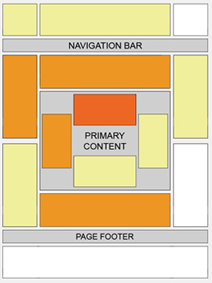
- Provide some free space around ads so that they stand out and users know where to find them. Dont clutter up the ads inside your content.
- Experiment by changing the location of advertisements. Track them by channels to see which location works. Sometimes unusual locations can can do wonders for your CTR. Google Adsense support provides some good ideas for better blending
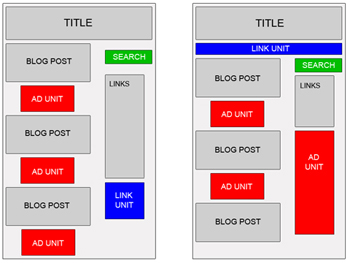
- Many experienced Adsense users have reported better CTR with vertical ads rather than the horizontal ones. But that really depends on your site structure.
- Usually it is recommended to place towers on your right, as users tend to use the mouse to scroll the bar on the right side wiht a higher chance to see your ads. Some have reported doubling CTR’s by placing towers to the left rather than the right, as people have got bored of seeing ads on the right, it has something to do with the sidedness of the brain which I do not understand and there is a tendency to read from left to the right.
- Many sites will have small ads in the top right hand corner, as they claim it is the first place where the eye sees.
- An excellent article on Eyetracking - What We Saw When We Looked Through Their Eyes helps to tell you where users actually see first and in what order.
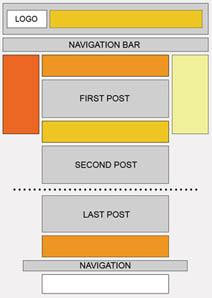
- Forums are tricky becasue they have a different kind of navigation, readership and participation. Here are some ad placements suggested by Google which work best for forums
Best Google Adsense Link Colors to get higher CTR?
- Match the colors of your ads with the colour scheme of your site. Blending with your sites color profile helps to identify them not as ads, but as links similar to those of your site. The more the AdSense looks like part of your site, the higher CTR you will get. You can also match the Adsense fonts with your website font design for great results.
- Blend ads with your page - remove the borders by having a similar color as your background helps to show ads as being part of your site. Do not blend text or the ‘Ads by Gooooogle’ with your background color as it is against Google TOS (Google does not like hidden text!). However, such blending may not work for you always due to banner blindness. Neither do they see the ads, not do they click on them. So sometimes a bold contrasting ad may work better depending on your website design.
- Experiment by changing the colors, background of advertisements. You have to find out what works best for your site, not others. You can also rotate Adsense colors to reduce ad blindness.
I hope these tips help to get your Adsense CTR up by at least 100% if not more. Good luck and make more money!
How ADSENSE works
- The webmaster inserts the AdSense JavaScript code into a webpage.
- Each time this page is visited, the JavaScript code creates an IFrame with a
srcattribute set to the page's URL. - For contextual advertisements, Google's servers use a cache of the page to determine a set of high-value keywords. If keywords have been cached already, advertisements are served for those keywords based on the AdWords bidding system. (More details are described in the AdSense patent.)
- For site-targeted advertisements, the advertiser chooses the page(s) on which to display advertisements, and pays based on cost per mille (CPM), or the price advertisers choose to pay for every thousand advertisements displayed.
- For referrals, Google adds money to the advertiser's account when visitors either download the referred software or subscribe to the referred service.The referral program will be retired in August 2008.
- Search advertisements are added to the list of results after the visitor performs a search.
- Because the JavaScript is sent to the Web browser when the page is requested, it is possible for other website owners to copy the JavaScript code into their own webpages. To protect against this type of fraud, AdSense customers can specify the pages on which advertisements should be shown. AdSense then ignores clicks from pages other than those specified.
Google Adsense
AdSense is an advertisement application run by Google. Website owners can enroll in this program to enable text, image, and more recently, video advertisements on their websites. These advertisements are administered by Google and generate revenue on either a per-click or per-impression basis.
Overview
Google uses its Internet search technology to serve advertisements based on website content, the user's geographical location, and other factors. Those wanting to advertise with Google's targeted advertisement system may enroll through AdWords. AdSense has become a popular method of placing advertising on a website because the advertisements are less intrusive than most banners, and the content of the advertisements is often relevant to the website.
Currently, AdSense uses JavaScript code to incorporate the advertisements into a participating website. If the advertisements are included on a website that has not yet been crawled by the Mediabot, AdSense will temporarily display advertisements for charitable causes, also known as public service announcements (PSAs). (The Mediabot is different from the Googlebot, which maintains Google's search index.)
Many websites use AdSense to monetize their content. AdSense has been particularly important for delivering advertising revenue to small websites that do not have the resources for developing advertising sales programs and salespeople. To fill a website with advertisements that are relevant to the topics discussed, webmasters implement a brief script on the websites' pages. Websites that are content-rich have been very successful with this advertising program, as noted in a number of publisher case studies on the AdSense website.
Some webmasters invest significant effort into maximizing their own AdSense income. They do this in three ways:[citation needed]
- They use a wide range of traffic-generating techniques, including but not limited to online advertising.
- They build valuable content on their websites that attracts AdSense advertisements, which pay out the most when they are clicked.
- They use copy on their websites that encourages visitors to click on advertisements. Note that Google prohibits webmasters from using phrases like "Click on my AdSense ads" to increase click rates. The phrases accepted are "Sponsored Links" and "Advertisements".
The source of all AdSense income is the AdWords program, which in turn has a complex pricing model based on a Vickrey second price auction. AdSense commands an advertiser to submit a sealed bid (i.e., a bid not observable by competitors). Additionally, for any given click received, advertisers only pay one bid increment above the second-highest bid.
Subscribe to:
Posts (Atom)


 Posts
Posts

